 NewsLoop
The mobile app API
NewsLoop has a REST API that the NewsLoop app uses. You can also use it for your own apps and integrations.
Building your own app? Start with Building an app on the API: a walkthrough in Dart: a complete, runnable client that fetches articles, shows their text, signs in, and handles a 401. How NewsLoop fits together shows where the API sits among NewsLoop's parts.
Your base URL
Every API address starts with your base URL: your site's address followed by /api/v1. For a site at https://news.example.com, it is https://news.example.com/api/v1, and the site's details are at https://news.example.com/api/v1/site.
To find yours, sign in to the admin and open App → Mobile app: the API address at the top is your base URL, ready to copy (see Setting up the app). Open it with /site added in your browser to check it: you should see your site's name. Use https://.
In these pages, paths such as GET /posts are added to your base URL.
- Start here: Your first API call checks your setup in a couple of minutes: fetch your site's name, then the latest articles.
- Every endpoint, with examples: API endpoints.
- Full description: your base URL followed by
/openapi.json(OpenAPI 3.1). Open it in Swagger Editor, Stoplight, Insomnia or Postman. - Postman: import
newsloop.postman_collection.jsonfrom theDocumentation/apifolder of your download, then set thebase_urlvariable. Signing in fills thetokenvariable by itself. Trying the API in Postman walks through every variable and signing in. - When something goes wrong: Troubleshooting covers rate limits, paging with cursors, and
304 Not Modified. - What can change: Versioning and changes.
Setting up the app
Go to App → Mobile app in the admin.
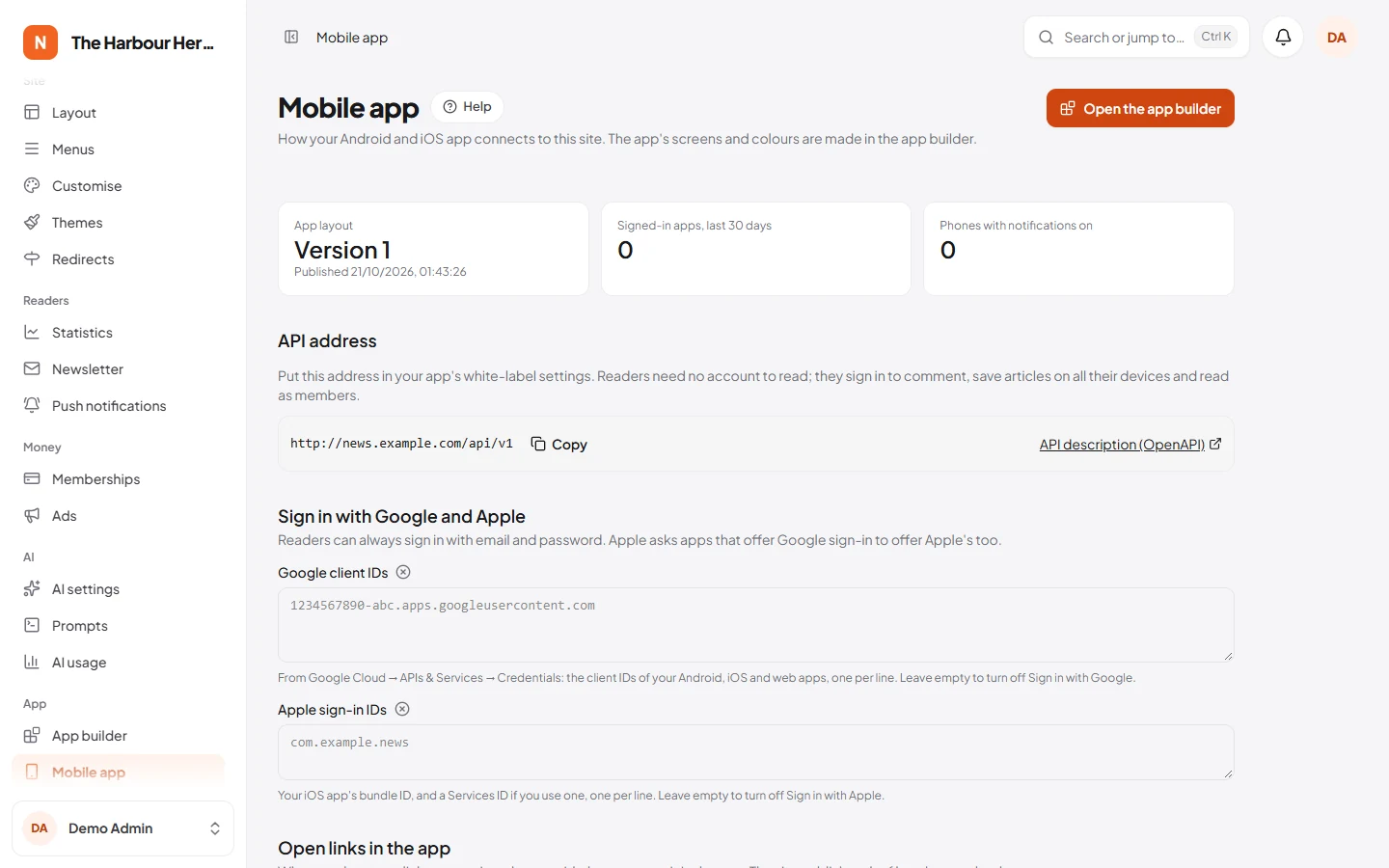
- API address. Copy it into
api_urlin the app'swhitelabel.yaml(see Building the app). - Sign in with Google (optional). In Google Cloud, create OAuth client IDs for your Android app, your iOS app and a web client. Paste all of them, one per line. Leave the box empty to hide the Google button.
- Sign in with Apple (optional, but Apple requires it on iOS if you offer Google). In your Apple developer account, turn on Sign in with Apple for your app ID. Paste the bundle ID, such as
com.example.news. - Open links in the app. Fill in the Android package name and the SHA-256 fingerprint from Google Play Console → Setup → App signing, and the iOS app ID (team ID, a dot, then the bundle ID). The site then publishes
/.well-known/assetlinks.jsonand/.well-known/apple-app-site-association, which phones check before opening your links in the app. - Store pages. Links to your Google Play and App Store pages, shown on the site and in the app.
The app's screens, colours and menus come from the app builder. Until you publish a layout there, the app uses a built-in one in your site's languages.
Basics
| Language | Add ?lang=ar, or send Accept-Language. Answers say which language they are in, in Content-Language. |
| Signing in | POST /auth/token (email and password), /auth/register or /auth/social (Google or Apple) return a token. Send it as Authorization: Bearer <token>. Reading needs no account. See Sign-in tokens, from start to finish. |
| Pages | Lists return meta.next_cursor. Send it back as cursor for the next page. Search uses page. Edge cases: Paging through lists. |
| Caching | Every answer to a GET has an ETag. Send it back in If-None-Match, and an unchanged answer comes back as 304 with no body. See 304 Not Modified and ETag. |
| Limits | 60 requests a minute without an account, 120 with one, 5 sign-in attempts a minute. Over the limit you get 429 with Retry-After. See Rate limits; site owners change the limits with NEWSLOOP_API_GUEST_LIMIT and NEWSLOOP_API_MEMBER_LIMIT (Changing the limits). |
| Errors | JSON with a message. Validation errors (422) also have errors, per field. |
| Stability | Version 1 never breaks. New fields may appear, so ignore fields you do not know. See Versioning and changes. |
Endpoints
| Area | Endpoints |
|---|---|
| Site | GET /site (name, logo, languages, features, links, app icon and splash), GET /app/config (the app layout), GET /resolve?url= (what a website address shows) |
| Articles | GET /posts by source and filters, GET /posts/{id}, /related, /live-updates, POST /posts/{id}/views, POST and DELETE /posts/{id}/like, GET /trending, GET /search?q= |
| Comments | GET and POST /posts/{id}/comments |
| Sections | GET /categories, /categories/{id}, /tags, /tags/{id}, /authors/{id}, /pages/{id or address} |
| Memberships | GET /plans |
| Notifications | GET /push/topics, POST and DELETE /devices |
| Accounts | POST /auth/register, /auth/token, /auth/social, /auth/forgot-password, /auth/email/verification-notification, DELETE /auth/token, GET, PATCH and DELETE /me |
| Bookmarks | GET and POST /me/bookmarks, DELETE /me/bookmarks/{id}, POST /me/bookmarks/sync |
Article lists
GET /posts?source=… takes the same data sources as the app builder: latest, featured, trending, breaking, editorsPicks, category, tag, author, series, video and live. Filters combine, for example ?source=video&category=4. sort=oldest or sort=popular changes the order.
featured, trending, breaking and editorsPicks are short ranked lists without further pages. Editor's picks are the articles in the website's Editor's picks block, so you choose them once for both.
Showing an article's text (content_html)
content_html in GET /posts/{post} is the article's text as safe HTML, ready to show. The site has already removed scripts, styles and anything unsafe, so you can show it with an HTML widget (such as flutter_widget_from_html) or a web view. It is the same HTML as on the website, with two differences made for apps:
- Ad blocks are left out. Ads are a website feature: the app API sends no ad code and no ad markers.
- Related-article blocks hold a plain link to the article, with its title.
Every element it can contain, and what to do with each:
| Element | What it is | In your app |
|---|---|---|
<p>, <h2> to <h4>, <ul>, <ol>, <blockquote>, <pre><code>, <hr>, <strong>, <em>, <a> |
Ordinary text | Show as it is. |
<figure class="nf-figure nf-figure--normal"> (or --wide, --full, --small), with an <img> that has srcset, and a <figcaption> with the caption and <span class="nf-credit"> |
A picture | Show as it is. Pick a size from srcset for the screen. |
<div class="nf-gallery"> with <figure class="nf-gallery__item"> items |
A gallery | Show as it is, or as a native swipeable gallery. |
<div class="nf-table"><table> |
A table | Show as it is, scrolling sideways when wide. |
<aside class="nf-callout nf-callout--info"> (or --warning, --success, --note), with an optional <p class="nf-callout__title"> |
A highlighted box in the text | Show as it is, styled by its kind. It is not a related article. |
<figure class="nf-pullquote"> with a <blockquote> and a <figcaption> |
A pull quote | Show as it is, or styled larger. |
<figure class="nf-embed nf-embed--youtube"> (or vimeo, spotify, soundcloud), with an <iframe> |
A video or audio player | Show it in a web view, or as a button that opens it. The NewsLoop app shows a button. |
<blockquote class="nf-social-embed" data-provider="x"> (or instagram, facebook, tiktok), with a link |
A social media post | Show as it is: a link to the post. |
<p class="nf-embed-link"> with a link |
A link to something that can't be embedded | Show as it is. |
<aside class="nf-related" data-post-id="12"><a href="…">Title</a></aside> |
A related article the editor placed in the text | Replace with a native card that opens GET /posts/12 (the ID is in data-post-id). Showing it as it is also works: it is a link, which the app can open itself with GET /resolve?url=. Related articles that aren't published are already removed. |
Notes:
- Locked articles (
locked: true) contain only the opening paragraphs. Show them, then your membership or sign-in offer. See Subscribers-only articles. - Links to your own site open best in the app:
GET /resolve?url=<address>says what the link points to (an article, a section, a tag and so on). - The markers always look exactly like the examples above, so a simple pattern finds them. The walkthrough has
splitBody, a complete Dart function that cutscontent_htmlinto HTML parts and related articles.
Subscribers-only articles
GET /posts/{post} is open to everyone, and a token is optional. Most articles come back in full to every caller. Only articles marked subscribers-only (is_premium: true) depend on who asks:
| Who asks | What they get |
|---|---|
| No token, or a signed-in reader without a membership | The opening only, with locked: true. With a metered paywall, the meter decides (below). |
| A signed-in reader with an active membership, or a staff account | The whole article, with locked: false. |
| Any signed-in reader, when memberships are switched off on the site | The whole article. |
An invalid or expired token is treated like no token: this endpoint never answers 401. So send the reader's token whenever you have one, and nothing when you don't. Don't make readers sign in just to read.
The metered paywall (X-NF-Meter). If the site gives a few free subscribers-only articles a month (Free subscribers-only articles per month under Money → Memberships, see Ads and memberships), readers without a membership get meta.meter with every subscribers-only article:
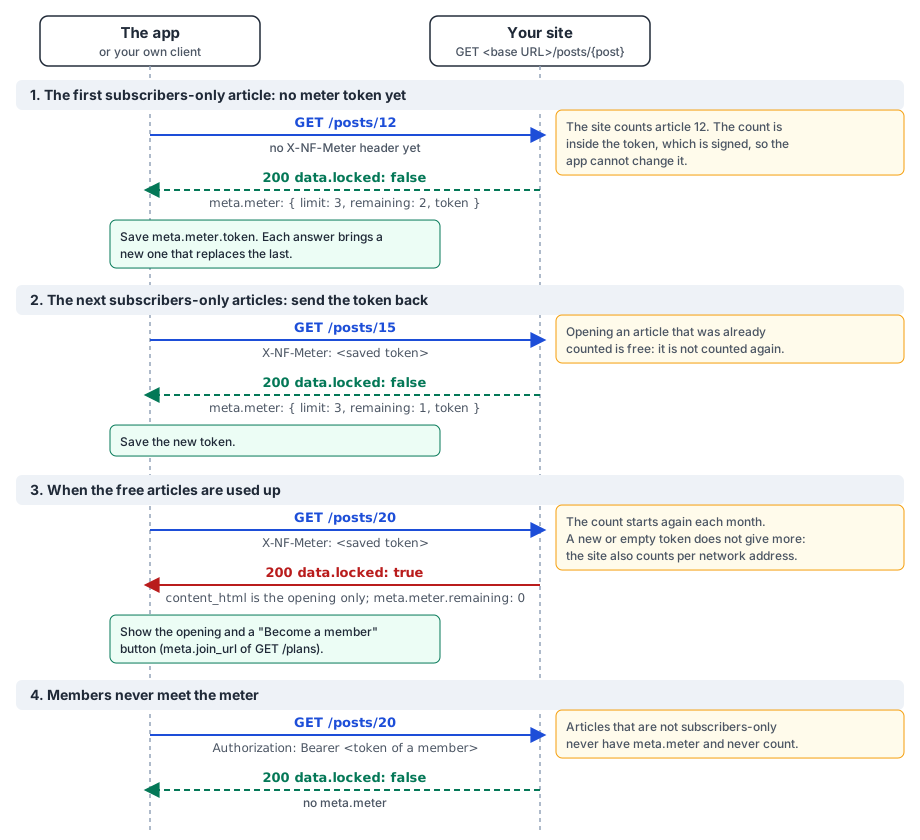
- The first answer has
meta.meter:{ "limit": 3, "remaining": 2, "token": "…" }, andlocked: falsewhile free articles are left. - Keep the token, and send it in the
X-NF-Meterheader with the next article. Every answer brings a new token: always keep the newest. - An article already counted this month opens again for free.
- When none are left, the answer has
locked: trueandremaining: 0. Show the opening and a "Become a member" button that opensmeta.join_urlofGET /plans. - The count starts again each month. The token is signed, so it can't be edited: a damaged or missing token starts a new count, as for a new reader. To stop endless fresh starts, the site also counts per network address, up to five times the monthly allowance.
Articles that aren't subscribers-only never have meta.meter and never count. Readers become members on the website; the app never handles card details.
The meter, request by request
An example with 3 free articles a month, for a reader without a membership. Our automated tests run this exact sequence, so it shows what the API really answers:
| # | Request | X-NF-Meter sent |
Answer | Why |
|---|---|---|---|---|
| 1 | GET /posts/101 |
none | locked: false, remaining: 2, token T1 |
No token yet: a new count starts. |
| 2 | GET /posts/102 |
T1 | locked: false, remaining: 1, token T2 |
The newest token: the count carries on. |
| 3 | GET /posts/101 |
T2 | locked: false, remaining: 1, token T3 |
Already counted this month: free. |
| 4 | GET /posts/103 |
not-a-real-token |
locked: false, remaining: 2, a new token |
Malformed (or edited) tokens are ignored, as if none were sent. Still 200, never an error. |
| 5 | GET /posts/104 |
T3 | locked: false, remaining: 0, token T5 |
Back to the newest good token: the last free article. |
| 6 | GET /posts/105 |
T5 | locked: true, remaining: 0, token T6 |
None left: the opening only. A new token still comes. |
| 7 | GET /posts/105 |
last month's token | locked: false, remaining: 2, a new token |
A token from an earlier month has run out: this month's count starts afresh. |
| 8 | GET /posts/7 (not subscribers-only) |
anything | locked: false, no meta.meter |
Ordinary articles never count. |
How your app should handle it:
- Keep only the newest token. After every article answer that has
meta.meter.token, replace the saved one. That includes locked answers (step 6). - Missing token (first launch, reinstall, cleared data): send no header. The site starts a new count (step 1).
- Malformed or edited token: you don't need to detect it. The site ignores it and starts a new count (step 4), and the answer brings a good token to keep. A meter problem never makes the request fail.
- Expired token (from last month): nothing to do. It starts the new month's count (step 7). Tokens don't expire in any other way.
- No
meta.meterin the answer: the article isn't subscribers-only, the reader is a member, or the site has no meter. Keep the token you have. - Send the token only to
GET /posts/{post}. Other endpoints ignore it, and a request with it can't use the site's shared cache. - Keep it per site, not per reader, in ordinary storage such as
SharedPreferences. It holds only a count of articles, nothing secret. - Members: send their sign-in token. They get whole articles and no
meta.meter, whatever meter token is sent.
Live blogs
Live blogs (type: live) get new entries while they run. Keep one up to date by polling GET /posts/{post}/live-updates:
- When the reader opens the live blog, load the first page and keep
meta.server_timefrom the answer. - While it is on screen, ask again every 20 to 30 seconds, with
sinceset to the lastmeta.server_time. You get only the entries added or edited since, often none. The NewsLoop app asks every 30 seconds, and the website every 20. - Stop while the screen is closed or the app is in the background, and ask once straight away when the reader comes back.
- Don't ask more often than every 10 seconds. Each reader counts towards the limit of 60 requests a minute without an account, and the first page is cached for 60 seconds anyway.
- Reload the first page (without
since) when the reader pulls to refresh. That also drops entries the newsroom deleted.
How caching affects the delay. With the steps above, a new entry reaches the app within one polling interval (30 seconds in the NewsLoop app), plus the time the request takes:
- Answers with
sinceare never kept on your server, and each one has a new address (itssincetime changes), so no cache on the phone or in a CDN can give an old copy. ETagnever delays anything. WithIf-None-Match, the site compares against the current answer and sends304only when nothing changed; otherwise you get the new entries at once. It only saves data.- Your server's own copy of the first page is renewed the moment an entry is saved, edited or deleted.
- The one case that can be slower: asking for the first page again (the same address, without
since) through an HTTP cache. Its answer saysCache-Control: public, max-age=60, stale-while-revalidate=300, so a phone's HTTP cache or a CDN may reuse its copy for up to 60 seconds, and then hand out the old copy once more while it fetches the new one. The worst case is then about the polling interval plus 60 seconds. Avoid it by polling withsince, or by sendingCache-Control: no-cachewith the request, which makes the cache check with the site first (you still get a304when nothing changed). - Entries scheduled for later appear in the first
sinceanswer after their time. In the first page (withoutsince), they can take up to the site's page cache time to appear: Keep ready-made pages for (minutes) under System → Site settings → Reading, 10 minutes by default.
Subscribers-only live blogs (is_premium: true) keep their entries for readers who can read the article: members (send the token), or readers whose meter token already counts it. Open the article with GET /posts/{post} first, then send its meter token in X-NF-Meter with each request. Anyone else gets 403. These answers are never cached.
Sign-in tokens, from start to finish
Reading needs no account. For a reader's own things (their account, bookmarks and likes), the app needs a token:
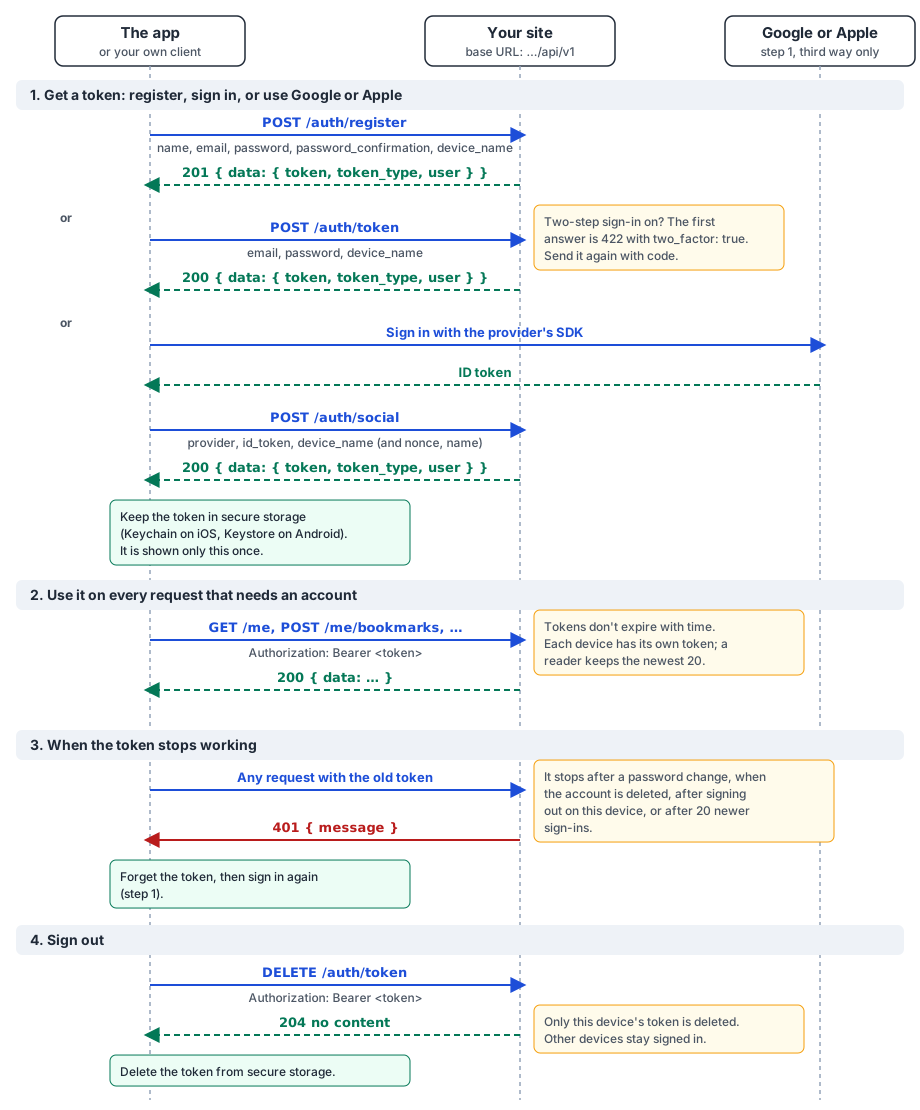
- Get a token in one of three ways. Each answers
{ "data": { "token": "…", "token_type": "Bearer", "user": { … } } }:- register:
POST /auth/registerwithname,email,password,password_confirmationanddevice_name(201); - sign in:
POST /auth/tokenwithemail,passwordanddevice_name(200). With two-step sign-in on, see Two-step sign-in; - Google or Apple: sign in with the provider's SDK, then send its ID token to
POST /auth/social(200; see Google and Apple).
- register:
- Keep it safe. The token is shown only this once; the site stores only a hash of it. Keep it in the phone's secure storage (the NewsLoop app uses the iOS Keychain and the Android Keystore), never in plain files or logs.
- Use it. Send
Authorization: Bearer <token>with every request that needs an account, such asGET /meorPOST /me/bookmarks.- Tokens don't expire with time.
- Each device has its own token, named by
device_name. A reader keeps the newest 20; signing in on a 21st device ends the oldest.
- When it stops working, any request answers
401. Forget the token and sign in again. A token stops working:- when the reader changes their password (every device is signed out);
- when the account is deleted;
- after signing out on that device;
- after 20 newer sign-ins.
- Sign out with
DELETE /auth/token, sending the token. It answers204and deletes only this device's token, so the reader's other devices stay signed in. Then delete the token from the phone.
A complete example in Dart
Building an app on the API: a walkthrough in Dart is a complete, runnable Dart program, explained step by step. It fetches article lists page by page, opens an article and splits its content_html into native parts, signs in and keeps the token, handles a 401 by getting a new token (one shared sign-in, then a retry), and signs out. It needs only the Dart SDK, and is in your download as Documentation/api/examples/newsloop_client.dart.
Two-step sign-in
If an account has two-step sign-in, POST /auth/token first answers 422 with two_factor: true. Ask for the code from the authenticator app and send the same request again with code, or recovery_code.
Google and Apple
Sign in with the provider's own SDK in the app, then send its ID token to POST /auth/social with provider (google or apple). If you used a nonce, send the raw nonce too. Apple sends the reader's name only the first time, so pass it as name.
New readers get an account with a confirmed email. Existing reader accounts with the same confirmed email are connected. Staff accounts and accounts with two-step sign-in are not: they sign in with their password.
Deleting an account
DELETE /me with the password. Accounts made with Google or Apple have no password; they send confirm: true. Any membership is stopped at the payment company first. Staff accounts cannot be deleted from the app.
Notifications
The app subscribes to Firebase topics itself. GET /push/topics lists them. Subscribe to both fcm_topic and fcm_language_topic: notifications for one language go to the second, those for everyone to the first. POST /devices records the phone's token and topics, which links it to the reader when signed in.
Layout sources that depend on the screen
The app layout (GET /app/config) may use two data sources that GET /posts does not take, because their meaning depends on the page:
currenton a section page is that section: ask forGET /posts?source=category&category={id}, with the samesortandlimit.relatedon an article page lists articles related to it: ask forGET /posts/{id}/related?limit=.
Likes
GET /posts/{id} has likes: {count, liked}; liked is true when the signed-in reader liked it. Signed-in readers like with POST /posts/{id}/like and take it back with DELETE. Both answer with the new count. Guests see the count only, and it can be a few minutes old, as answers for guests are cached.
Saved articles
Save with POST /me/bookmarks, remove with DELETE /me/bookmarks/{id}. After working offline, send everything saved and removed to POST /me/bookmarks/sync. It answers with every saved article ID. A reader can save up to 1,000 articles.
Syncing more than 500 changes. One sync request takes up to 500 items in add and up to 500 in remove. More than that answers 422 (errors.add or errors.remove), and nothing is changed. To send more, split them into batches:
- Send the removals first, in batches of up to 500 (
{"remove": [...]}). They make room under the 1,000-article limit. - Then the additions, in batches of up to 500 (
{"add": [...]}), oldest first. - One request at a time, in order. Wait for each answer before sending the next.
- After each
200, mark that batch as done on the phone. The answer'spost_idsis the reader's whole saved list at that moment: after the last batch, make the phone's list match it exactly. - If a request fails (no connection,
429,5xx), send the same batch again later. Sync is safe to repeat: saving an article that is already saved, or removing one that isn't, changes nothing. Each request is applied completely or not at all. - A
422witherrors.post_idmeans the reader would go over 1,000 saved articles. Stop, keep the rest on the phone, and ask the reader to remove some. Articles that are no longer published are skipped without an error.
The limit-reached answer is under POST /me/bookmarks/sync in the API reference.
Trying it
curl https://news.example.com/api/v1/posts?limit=3

curl -X POST https://news.example.com/api/v1/auth/token \
  -H "Content-Type: application/json" \
  -d '{"email":"reader@example.com","password":"…","device_name":"curl"}'

curl https://news.example.com/api/v1/me -H "Authorization: Bearer 1|nf_…"