 NewsLoop
How NewsLoop fits together
This page shows what you deploy when you install NewsLoop, and how its parts talk to each other and to outside services. Read it before you install. If you plan to build on the API, it shows where your app fits.
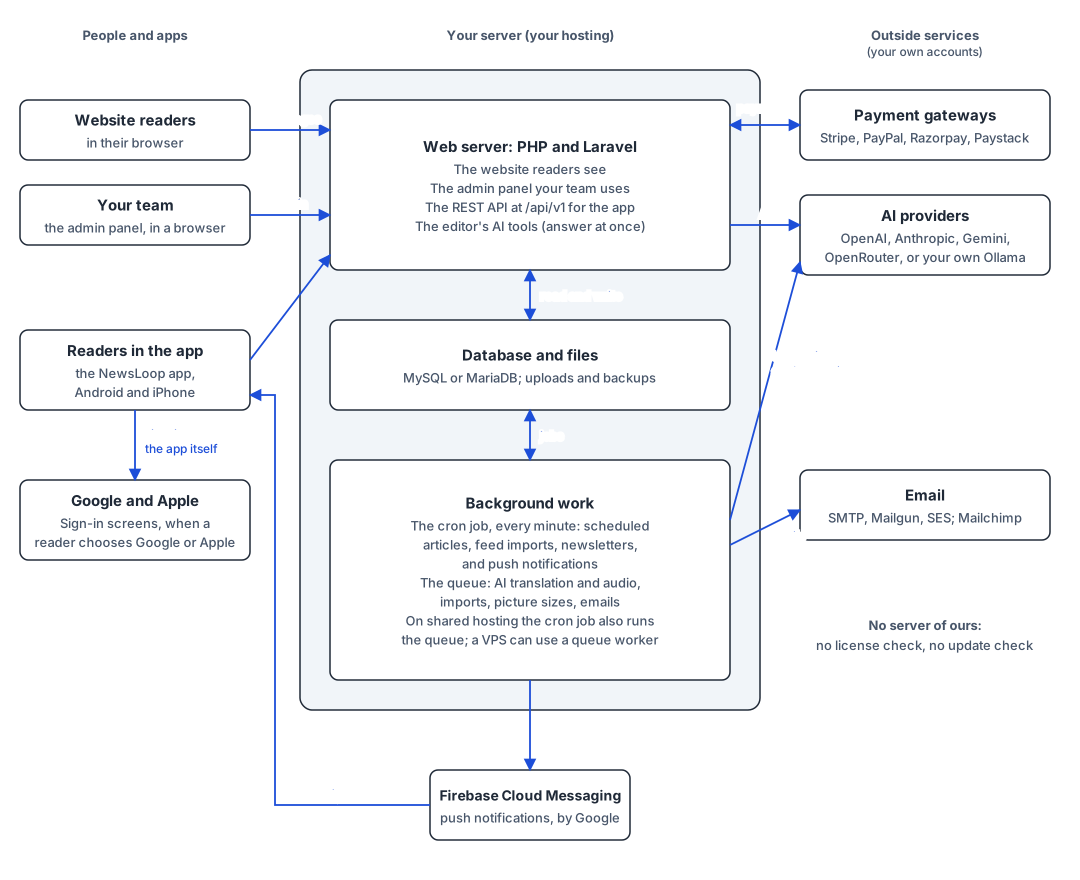
What you deploy
Everything in the middle box runs on your own hosting. There is one application, with two kinds of work:
| Part | What it does | What you set up |
|---|---|---|
| Web server (PHP and Laravel) | Answers every request: the website readers see, the admin panel your team uses, and the REST API (/api/v1) the app uses. The editor's AI tools (writing, rewriting, headlines, summaries) call your AI provider from here and answer at once. |
Shared hosting or a VPS with PHP 8.3: Installing. |
| Database and files | Articles, users, settings and everything else, in MySQL or MariaDB. Uploads and backups are files on the same server. | A database, made in your hosting panel. |
| Background work | Work that takes longer than a page view. The cron job runs every minute: scheduled articles, feed imports, newsletters and push notifications. The queue runs AI translation and audio, imports, picture sizes and emails. | The cron job, always (Installing, step 4). On shared hosting it also runs the queue. On a VPS you can run a queue worker instead (Queue worker). |
| The mobile app | The NewsLoop app for Android and iPhone, with your name, icon and colours. It reads everything through the REST API, and its layout comes from the app builder. | You build it and publish it under your own store accounts: Building the app. |
The website, the admin panel and the API are one application, at one address. The app is the only part that runs somewhere else: on readers' phones.
Who talks to whom
Every connection, who starts it, and when. Outside services use your own accounts, and none is contacted until you set it up.
| From | To | What for | When |
|---|---|---|---|
| Readers' browsers | Web server | The website | Every page view |
| Your team's browsers | Web server | The admin panel | While they work |
| The app | Web server | The REST API, in JSON over HTTPS | Every screen; see REST API |
| Web server | AI provider | The editor's AI tools | When an editor uses one |
| Background work | AI provider | Translation, audio, feed rewrites | When one is started |
| Web server | Payment gateway | Checkout | When a reader buys a membership |
| Payment gateway | Web server | Payment results (signed webhooks to /webhooks/payments/{gateway}) |
After each payment, renewal or refund |
| Background work | Email service, Mailchimp | Emails and newsletters | When one is sent |
| Background work | Firebase Cloud Messaging | Push notifications | When one is sent; Firebase then delivers it to the app and to browsers |
| Web server | Google and Apple | Checking a reader's Google or Apple sign-in (their public keys) | When a reader signs in that way |
| The app | Google and Apple | Sign-in screens | When a reader chooses Google or Apple |
| Readers' browsers | Google AdSense | Website ads | Only with your AdSense publisher ID |
| Background work | The news feeds you import from | Reading the feeds, and their pictures | Only for the feeds you add (Importing) |
| Web server | Picture addresses | Copying a picture into the media library | When someone imports a picture by its address, or pastes an article with pictures |
| Web server | Your own site | Preparing the busiest pages again right after you publish, so the first readers get them quickly | After each publish |
Apart from these, your server contacts nothing. NewsLoop contacts no server of ours: there is no license check and no update check. Disclosures lists every outside service with its cost, and Outside services and your accounts explains how to set each one up.
For developers planning an integration
- Clients only talk to the REST API. The NewsLoop app has no database access and no special endpoints: anything it does, your own app or website can do with the same API. Start with REST API, then follow Building an app on the API.
- Background work must run for push notifications, newsletters, translations and imports. If the System page says the cron job isn't running, those wait.
- The app's layout comes from the server. Screens, menus and colours are published from the app builder and fetched with
GET /app/config, so they change without a store release. - Webhooks come in, never go out. Payment gateways call your site. NewsLoop sends no webhooks of its own.