 NewsLoop
Building an app on the API: a walkthrough in Dart
This walkthrough builds the core of a news app on the NewsLoop REST API, in Dart, step by step:
- fetch article lists page by page;
- open an article and show its
content_html, with native cards for related articles; - sign in and keep the token;
- handle a
401, including getting a new token, then retry; - sign out.
Every piece of code on this page comes from one complete program, newsloop_client.dart. It needs only the Dart SDK, with no packages, and runs against your own site. It is in your download as Documentation/api/examples/newsloop_client.dart, and in full at the end of this page. The NewsLoop app works the same way; this program is the short version for your own app.
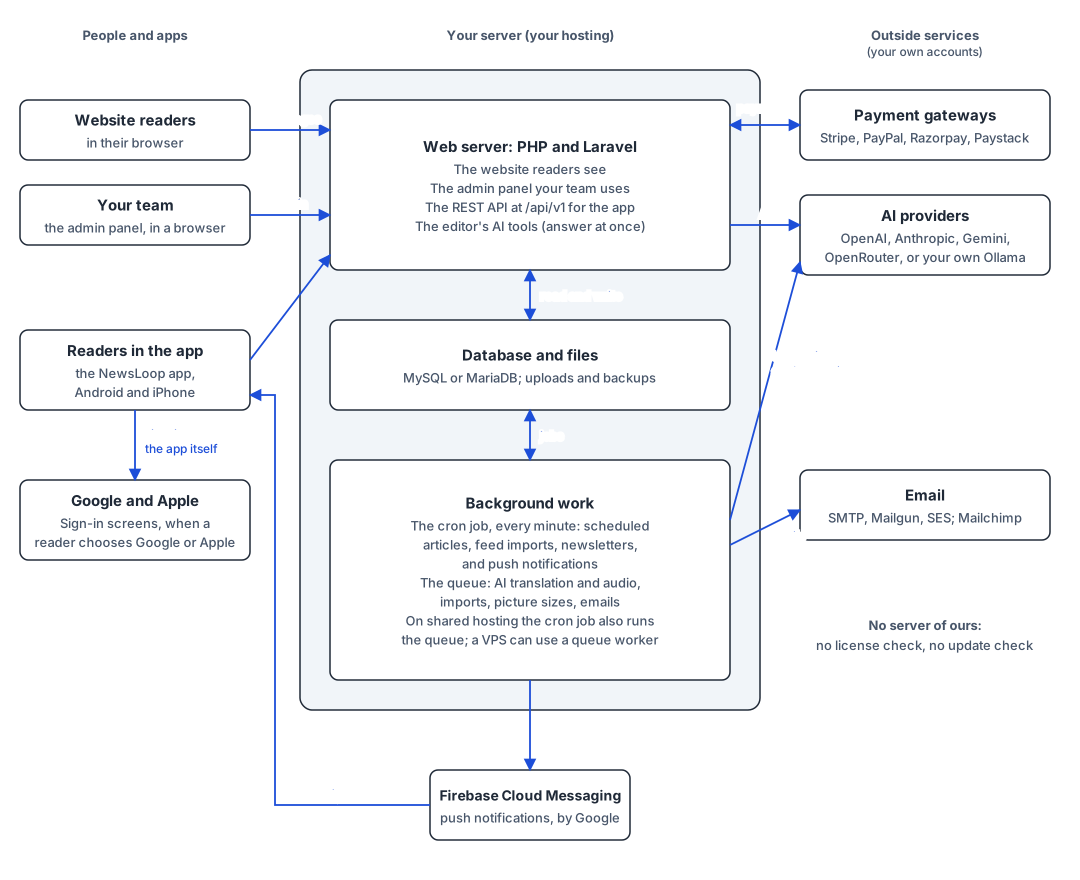
Before you start
- Your base URL is your site's address followed by
/api/v1, such ashttps://news.example.com/api/v1. App → Mobile app in your admin shows it. See Your base URL. - Check it: open
<base URL>/sitein a browser. You should see your site's name in JSON. That answer also tells the app which features are on (features), such as Google sign-in and memberships. - Use a test copy of your site. The program signs up a test reader,
dart.example@example.com. Delete the reader afterwards under Readers in the admin.
Step 1: the client and the token store
ApiClient sends every request, adds Accept: application/json, and keeps the sign-in token in a TokenStore. In this program the token lives in memory. In a Flutter app, use the SecureTokenStore at the end of the file, which keeps it in the iOS Keychain or the Android Keystore with flutter_secure_storage.
/// Where the token is kept between requests (and, in an app, between launches).
abstract interface class TokenStore {
  Future<String?> read();
  Future<void> write(String token);
  Future<void> delete();
}

/// Keeps the token in memory, which is enough for this example.
class MemoryTokenStore implements TokenStore {
  String? _token;

  @override
  Future<String?> read() async => _token;

  @override
  Future<void> write(String token) async => _token = token;

  @override
  Future<void> delete() async => _token = null;
}
Step 2: fetch articles
Reading needs no account. GET /posts gives one page of articles, newest first. Its meta.next_cursor is the cursor of the next page, or null on the last page. Send the same source and filters with the cursor, or the page is wrong.
/// One page of articles. Open to everyone: no token needed. Pass the
/// previous page's nextCursor to get the next page, with the same source
/// and filters.
Future<ArticlePage> articles({
  String source = 'latest',
  int limit = 20,
  String? cursor,
}) async {
  final query = Uri(
    queryParameters: {
      'source': source,
      'limit': '$limit',
      if (cursor != null) 'cursor': cursor,
    },
  ).query;
  final answer = await _send('GET', '/posts?$query');
  if (!answer.ok) throw ApiException(answer);
  return ArticlePage(
    (answer.json!['data'] as List).cast<Map<String, dynamic>>(),
    answer.json!['meta']?['next_cursor'] as String?,
  );
}

/// An article. Open to everyone; the token is optional and only changes
/// the answer for subscribers-only articles. The meter token is sent back
/// and the newest one kept, whatever happens.
Future<Map<String, dynamic>> article(int id) async {
  final answer = await _send(
    'GET',
    '/posts/$id',
    withToken: true,
    meterToken: _meterToken,
  );
  if (!answer.ok) throw ApiException(answer);
  final meter = answer.json!['meta']?['meter'];
  if (meter is Map && meter['token'] is String) {
    _meterToken = meter['token'] as String;
  }
  return answer.json!['data'] as Map<String, dynamic>;
}- Other lists use the same call with another
source:featured,trending,breaking,editorsPicks,category(withcategory=<id>),tag,author,series,videoandlive. See Article lists. - Opening an article is
GET /posts/{id}. The token is optional there: without one, readers get the public answer; with one, a member gets the whole of a subscribers-only article. The client also keeps the meter token for metered paywalls. - Save data with
If-None-Match: an unchanged list answers304with no body. See Troubleshooting.
Step 3: show the article's text
content_html is safe HTML, ready to show. One kind of element in it is a marker for the app to replace with its own native piece:
<aside class="nf-related" data-post-id="12"><a href="…">Title</a></aside>is a related article the editor placed in the text. Show it as a native card that opensGET /posts/12.
The app API sends no ad markers: ads are a website feature.
splitBody cuts the HTML into HTML parts and related articles, and keeps them in order:
/// A piece of an article's content_html, as an app shows it.
sealed class BodyPart {}
/// Ordinary HTML: paragraphs, headings, pictures, tables, quotes and so on.
/// Show it with an HTML widget, such as flutter_widget_from_html.
class HtmlPart extends BodyPart {
HtmlPart(this.html);
final String html;
}
/// A related article the editor placed in the text: show it as a native card
/// that opens the article with GET /posts/{postId}.
class RelatedPart extends BodyPart {
RelatedPart(this.postId, this.title, this.url);
final int postId;
final String title;
final String url;
}
/// The API writes related articles in exactly this form. It sends no ad
/// markers: ads are a website feature.
final _related = RegExp(
r'<aside class="nf-related" data-post-id="(\d+)"><a href="([^"]*)">(.*?)</a></aside>',
);
List<BodyPart> splitBody(String html) {
final parts = <BodyPart>[];
var start = 0;
for (final m in _related.allMatches(html)) {
final before = html.substring(start, m.start).trim();
if (before.isNotEmpty) parts.add(HtmlPart(before));
parts.add(
RelatedPart(
int.parse(m.group(1)!),
_unescape(m.group(3)!),
_unescape(m.group(2)!),
),
);
start = m.end;
}
final rest = html.substring(start).trim();
if (rest.isNotEmpty) parts.add(HtmlPart(rest));
return parts;
}
String _unescape(String s) => s
.replaceAll('"', '"')
.replaceAll(''', "'")
.replaceAll('<', '<')
.replaceAll('>', '>')
.replaceAll('&', '&');Show each HtmlPart with an HTML widget, such as flutter_widget_from_html. The NewsLoop app does the same with that package's customWidgetBuilder. Showing an article's text lists every element content_html can contain, and what to do with each.
Step 4: sign in and keep the token
POST /auth/token (email and password), POST /auth/register (a new account) and POST /auth/social (Google or Apple) each answer with a token. It is shown only this once, so the client stores it straight away. Send a device_name, such as the phone's model: the reader sees it in their list of signed-in devices.
// 1. Get a token.

Future<void> register(String name, String email, String password) async {
  final answer = await _send(
    'POST',
    '/auth/register',
    body: {
      'name': name,
      'email': email,
      'password': password,
      'password_confirmation': password,
      'device_name': deviceName,
    },
  );
  await _keepToken(answer);
}

Future<void> signIn(String email, String password) async {
  final answer = await _send(
    'POST',
    '/auth/token',
    body: {'email': email, 'password': password, 'device_name': deviceName},
  );
  // With two-step sign-in, the first answer is 422 with two_factor: true:
  // ask for the code and send the same request again with 'code'.
  if (answer.status == 422 && answer.json?['two_factor'] == true) {
    throw StateError('This account needs its two-step sign-in code.');
  }
  await _keepToken(answer);
}

Future<void> _keepToken(ApiAnswer answer) async {
  if (!answer.ok) throw ApiException(answer);
  // 2. Keep it: the token is shown only this once.
  final token = answer.json!['data']['token'] as String;
  await tokens.write(token);
}
With two-step sign-in on, the first answer is 422 with two_factor: true: ask for the code and send the same request again with code. See Two-step sign-in.
Step 5: a 401, and getting a new token
Every request that needs an account sends Authorization: Bearer <token>. When a token stops working, the answer is 401.
NewsLoop has no refresh token, and tokens don't expire with time. A token works until it is revoked:
- the reader changed their password (every device is signed out);
- the reader signed out on this device;
- the account was deleted;
- the reader signed in on 20 newer devices.
So refreshing the token means getting a new one by signing in again. signedIn does this:
- It sends the request with the stored token.
- On a
401, it forgets the token and callsonSignInNeeded, which your app sets. Requests that get a401at the same time wait for one shared sign-in, so the reader never sees the sign-in screen twice. - If the reader signed in, it sends the request again, once, with the new token. If they cancelled, the request fails with the
401, and the app carries on signed out.
// 3. Use it.

/// A request that needs a signed-in reader. After a 401, the app gets a
/// new token and the request is retried once.
Future<ApiAnswer> signedIn(
  String method,
  String path, {
  Map<String, dynamic>? body,
}) async {
  final sent = await tokens.read();
  var answer = await _send(method, path, body: body, withToken: true);
  if (answer.status == 401) {
    // 4. The token stopped working (password changed, signed out on this
    // device, account deleted, or 20 newer sign-ins). Join a sign-in that
    // is already under way; if one already finished, use its new token.
    final current = await tokens.read();
    final renewed = _refreshing != null || current == sent
        ? await _refreshToken()
        : current != null;
    if (renewed) {
      answer = await _send(method, path, body: body, withToken: true);
    }
  }
  if (!answer.ok) throw ApiException(answer);
  return answer;
}

/// NewsLoop has no refresh token: a token works until it is revoked, and
/// refreshing it means signing in again for a new one. Requests that get
/// a 401 at the same time wait for one shared sign-in.
Future<bool> _refreshToken() {
  return _refreshing ??= () async {
    try {
      await tokens.delete();
      final again = onSignInNeeded;
      return again != null && await again();
    } finally {
      _refreshing = null;
    }
  }();
}
What onSignInNeeded should do in your app:
- Email and password: show your sign-in screen, call
signIn, and returntrue, orfalseif the reader closes the screen. Never store the reader's password to sign in again silently. - Google or Apple: try the provider's silent sign-in first. If it gives you a new ID token, send it to
POST /auth/socialwithout showing anything. Otherwise show the sign-in screen. - Reading still works signed out. Only the reader's own things (their account, bookmarks and likes) need the token, so a cancelled sign-in shouldn't block the news.
Step 6: sign out
DELETE /auth/token ends this device's sign-in (204), even if the token had already stopped working. Then delete the token from the phone. The reader's other devices stay signed in.
Run it
dart run newsloop_client.dart https://news.example.com/api/v1This is its real output, run against a copy of the demo site with one extra article that has a related article in its text:
1. Fetch the latest articles, two pages (no account needed)
  55: Harbour works begin next month
  14: City council approves plan to rebuild the old harbour
  10: City council approves plan to rebuild the old harbour
  next page starts with: Election night: results as they come in
2. Open an article and split its content_html
  "Harbour works begin next month", locked: false
  HTML, 94 characters
  related article 44, "Election night: results as they come in": show a native card
  HTML, 45 characters
3. Register (or sign in if the test reader already exists)
  already registered, signed in
  signed in as dart.example@example.com
4. The token stops working, as after a password change
  401: the token stopped working, signing in again for a new one
  both requests worked again after 1 sign-in; bookmarks: 0
5. Sign out
  signed out; the token is gone: true
In step 4, two requests got a 401 at the same time, and the reader was signed in again only once.
The whole program
// A complete, runnable example of a NewsLoop app client, from start to end:
// fetch article lists page by page, open an article and split its
// content_html into HTML and the related articles an app shows natively,
// sign in, keep the token, send it with requests, handle a 401 by getting a
// new token (one shared sign-in, then the requests are retried), and sign out.
// It also keeps the metered paywall's token and waits after a 429.
//
// It needs only the Dart SDK (no packages). Run it against your own site:
//
// dart run newsloop_client.dart https://news.example.com/api/v1
//
// It signs up a test reader (or signs them in if they already exist), so use
// a test copy of your site, or delete the reader afterwards in the admin.
//
// In a Flutter app, keep the same ApiClient and swap MemoryTokenStore for the
// SecureTokenStore at the bottom of this file (flutter_secure_storage), so the
// token lives in the iOS Keychain or the Android Keystore.
import 'dart:convert';
import 'dart:io';
// #region store
/// Where the token is kept between requests (and, in an app, between launches).
abstract interface class TokenStore {
Future<String?> read();
Future<void> write(String token);
Future<void> delete();
}
/// Keeps the token in memory, which is enough for this example.
class MemoryTokenStore implements TokenStore {
String? _token;
@override
Future<String?> read() async => _token;
@override
Future<void> write(String token) async => _token = token;
@override
Future<void> delete() async => _token = null;
}
// #endregion store
/// An answer from the API: its status code and its JSON body (if any).
class ApiAnswer {
ApiAnswer(this.status, this.json);
final int status;
final Map<String, dynamic>? json;
bool get ok => status >= 200 && status < 300;
}
class ApiException implements Exception {
ApiException(this.answer);
final ApiAnswer answer;
@override
String toString() =>
'HTTP ${answer.status}: ${answer.json?['message'] ?? 'no message'}';
}
/// One page of an article list, and the cursor of the next page.
class ArticlePage {
ArticlePage(this.articles, this.nextCursor);
final List<Map<String, dynamic>> articles;
/// Null on the last page.
final String? nextCursor;
}
/// Called when the token no longer works (a 401). In an app, show the
/// sign-in screen and return true once the reader has signed in again.
typedef SignInAgain = Future<bool> Function();
class ApiClient {
ApiClient(this.baseUrl, this.tokens, {this.deviceName = 'Example app'});
/// Your base URL: your site's address followed by /api/v1.
final String baseUrl;
final TokenStore tokens;
final String deviceName;
final HttpClient _http = HttpClient();
/// Set by the app: what to do when the token stops working.
SignInAgain? onSignInNeeded;
/// The metered paywall's newest token (from meta.meter.token).
String? _meterToken;
/// The sign-in in progress after a 401, shared by every request that got one.
Future<bool>? _refreshing;
// #region articles
/// One page of articles. Open to everyone: no token needed. Pass the
/// previous page's nextCursor to get the next page, with the same source
/// and filters.
Future<ArticlePage> articles({
String source = 'latest',
int limit = 20,
String? cursor,
}) async {
final query = Uri(
queryParameters: {
'source': source,
'limit': '$limit',
if (cursor != null) 'cursor': cursor,
},
).query;
final answer = await _send('GET', '/posts?$query');
if (!answer.ok) throw ApiException(answer);
return ArticlePage(
(answer.json!['data'] as List).cast<Map<String, dynamic>>(),
answer.json!['meta']?['next_cursor'] as String?,
);
}
/// An article. Open to everyone; the token is optional and only changes
/// the answer for subscribers-only articles. The meter token is sent back
/// and the newest one kept, whatever happens.
Future<Map<String, dynamic>> article(int id) async {
final answer = await _send(
'GET',
'/posts/$id',
withToken: true,
meterToken: _meterToken,
);
if (!answer.ok) throw ApiException(answer);
final meter = answer.json!['meta']?['meter'];
if (meter is Map && meter['token'] is String) {
_meterToken = meter['token'] as String;
}
return answer.json!['data'] as Map<String, dynamic>;
}
// #endregion articles
// #region signin
// 1. Get a token.
Future<void> register(String name, String email, String password) async {
final answer = await _send(
'POST',
'/auth/register',
body: {
'name': name,
'email': email,
'password': password,
'password_confirmation': password,
'device_name': deviceName,
},
);
await _keepToken(answer);
}
Future<void> signIn(String email, String password) async {
final answer = await _send(
'POST',
'/auth/token',
body: {'email': email, 'password': password, 'device_name': deviceName},
);
// With two-step sign-in, the first answer is 422 with two_factor: true:
// ask for the code and send the same request again with 'code'.
if (answer.status == 422 && answer.json?['two_factor'] == true) {
throw StateError('This account needs its two-step sign-in code.');
}
await _keepToken(answer);
}
Future<void> _keepToken(ApiAnswer answer) async {
if (!answer.ok) throw ApiException(answer);
// 2. Keep it: the token is shown only this once.
final token = answer.json!['data']['token'] as String;
await tokens.write(token);
}
// #endregion signin
// #region refresh
// 3. Use it.
/// A request that needs a signed-in reader. After a 401, the app gets a
/// new token and the request is retried once.
Future<ApiAnswer> signedIn(
String method,
String path, {
Map<String, dynamic>? body,
}) async {
final sent = await tokens.read();
var answer = await _send(method, path, body: body, withToken: true);
if (answer.status == 401) {
// 4. The token stopped working (password changed, signed out on this
// device, account deleted, or 20 newer sign-ins). Join a sign-in that
// is already under way; if one already finished, use its new token.
final current = await tokens.read();
final renewed = _refreshing != null || current == sent
? await _refreshToken()
: current != null;
if (renewed) {
answer = await _send(method, path, body: body, withToken: true);
}
}
if (!answer.ok) throw ApiException(answer);
return answer;
}
/// NewsLoop has no refresh token: a token works until it is revoked, and
/// refreshing it means signing in again for a new one. Requests that get
/// a 401 at the same time wait for one shared sign-in.
Future<bool> _refreshToken() {
return _refreshing ??= () async {
try {
await tokens.delete();
final again = onSignInNeeded;
return again != null && await again();
} finally {
_refreshing = null;
}
}();
}
// #endregion refresh
// 5. Sign out.
Future<void> signOut() async {
if (await tokens.read() != null) {
// 204 even if the token had already stopped working.
await _send('DELETE', '/auth/token', withToken: true);
}
await tokens.delete();
}
/// One request. Waits and tries again when the rate limit is reached.
Future<ApiAnswer> _send(
String method,
String path, {
Map<String, dynamic>? body,
bool withToken = false,
String? meterToken,
}) async {
for (var attempt = 1; ; attempt++) {
final request = await _http.openUrl(method, Uri.parse('$baseUrl$path'));
request.headers.set(HttpHeaders.acceptHeader, 'application/json');
final token = withToken ? await tokens.read() : null;
if (token != null) {
request.headers.set(HttpHeaders.authorizationHeader, 'Bearer $token');
}
if (meterToken != null) request.headers.set('X-NF-Meter', meterToken);
if (body != null) {
request.headers.contentType = ContentType.json;
request.write(jsonEncode(body));
}
final response = await request.close();
final text = await response.transform(utf8.decoder).join();
final answer = ApiAnswer(
response.statusCode,
text.isEmpty ? null : jsonDecode(text) as Map<String, dynamic>,
);
// 429: wait for Retry-After (in seconds), then try again, up to 3 times.
if (answer.status == 429 && attempt < 3) {
final wait =
int.tryParse(
response.headers.value(HttpHeaders.retryAfterHeader) ?? '',
) ??
5;
await Future<void>.delayed(Duration(seconds: wait));
continue;
}
return answer;
}
}
void close() => _http.close();
}
// #region body
/// A piece of an article's content_html, as an app shows it.
sealed class BodyPart {}
/// Ordinary HTML: paragraphs, headings, pictures, tables, quotes and so on.
/// Show it with an HTML widget, such as flutter_widget_from_html.
class HtmlPart extends BodyPart {
HtmlPart(this.html);
final String html;
}
/// A related article the editor placed in the text: show it as a native card
/// that opens the article with GET /posts/{postId}.
class RelatedPart extends BodyPart {
RelatedPart(this.postId, this.title, this.url);
final int postId;
final String title;
final String url;
}
/// The API writes related articles in exactly this form. It sends no ad
/// markers: ads are a website feature.
final _related = RegExp(
r'<aside class="nf-related" data-post-id="(\d+)"><a href="([^"]*)">(.*?)</a></aside>',
);
List<BodyPart> splitBody(String html) {
final parts = <BodyPart>[];
var start = 0;
for (final m in _related.allMatches(html)) {
final before = html.substring(start, m.start).trim();
if (before.isNotEmpty) parts.add(HtmlPart(before));
parts.add(
RelatedPart(
int.parse(m.group(1)!),
_unescape(m.group(3)!),
_unescape(m.group(2)!),
),
);
start = m.end;
}
final rest = html.substring(start).trim();
if (rest.isNotEmpty) parts.add(HtmlPart(rest));
return parts;
}
String _unescape(String s) => s
.replaceAll('"', '"')
.replaceAll(''', "'")
.replaceAll('<', '<')
.replaceAll('>', '>')
.replaceAll('&', '&');
// #endregion body
Future<void> main(List<String> args) async {
final baseUrl =
(args.isNotEmpty ? args.first : 'http://127.0.0.1:8000/api/v1')
.replaceAll(RegExp(r'/+$'), '');
const email = 'dart.example@example.com';
const password = 'Example-Reader-2026!';
final api = ApiClient(baseUrl, MemoryTokenStore());
// In an app this shows the sign-in screen; here it signs in again directly.
var signIns = 0;
api.onSignInNeeded = () async {
signIns++;
print(' 401: the token stopped working, signing in again for a new one');
await api.signIn(email, password);
return true;
};
try {
print('1. Fetch the latest articles, two pages (no account needed)');
final first = await api.articles(limit: 3);
for (final a in first.articles) {
print(' ${a['id']}: ${a['title']}');
}
if (first.nextCursor != null) {
final second = await api.articles(limit: 3, cursor: first.nextCursor);
print(' next page starts with: ${second.articles.first['title']}');
}
print('2. Open an article and split its content_html');
final article = await api.article(first.articles.first['id'] as int);
final parts = splitBody(article['content_html'] as String);
print(' "${article['title']}", locked: ${article['locked']}');
for (final part in parts) {
print(switch (part) {
HtmlPart(:final html) => ' HTML, ${html.length} characters',
RelatedPart(:final postId, :final title) =>
' related article $postId, "$title": show a native card',
});
}
print('3. Register (or sign in if the test reader already exists)');
try {
await api.register('Dart Example', email, password);
print(' registered');
} on ApiException catch (e) {
if (e.answer.status != 422) rethrow;
await api.signIn(email, password);
print(' already registered, signed in');
}
final me = await api.signedIn('GET', '/me');
print(' signed in as ${me.json!['data']['email']}');
print('4. The token stops working, as after a password change');
final stale = await api.tokens.read();
await api.signOut(); // The server forgets this token...
await api.tokens.write(stale!); // ...but pretend the app still has it.
// Two requests at once both get a 401, and share one new sign-in.
final again = await Future.wait([
api.signedIn('GET', '/me'),
api.signedIn('GET', '/me/bookmarks'),
]);
print(
' both requests worked again after $signIns sign-in; '
'bookmarks: ${(again[1].json!['data'] as List).length}',
);
print('5. Sign out');
await api.signOut();
print(
' signed out; the token is gone: ${await api.tokens.read() == null}',
);
} finally {
api.close();
}
}
/*
In a Flutter app, keep the token in the Keychain or Keystore instead
(add flutter_secure_storage to pubspec.yaml):
import 'package:flutter_secure_storage/flutter_secure_storage.dart';
class SecureTokenStore implements TokenStore {
const SecureTokenStore([this._storage = const FlutterSecureStorage()]);
final FlutterSecureStorage _storage;
static const _key = 'newsloop_token';
@override
Future<String?> read() => _storage.read(key: _key);
@override
Future<void> write(String token) => _storage.write(key: _key, value: token);
@override
Future<void> delete() => _storage.delete(key: _key);
}
*/